Now in open beta

The event calendar your community will love to use!!

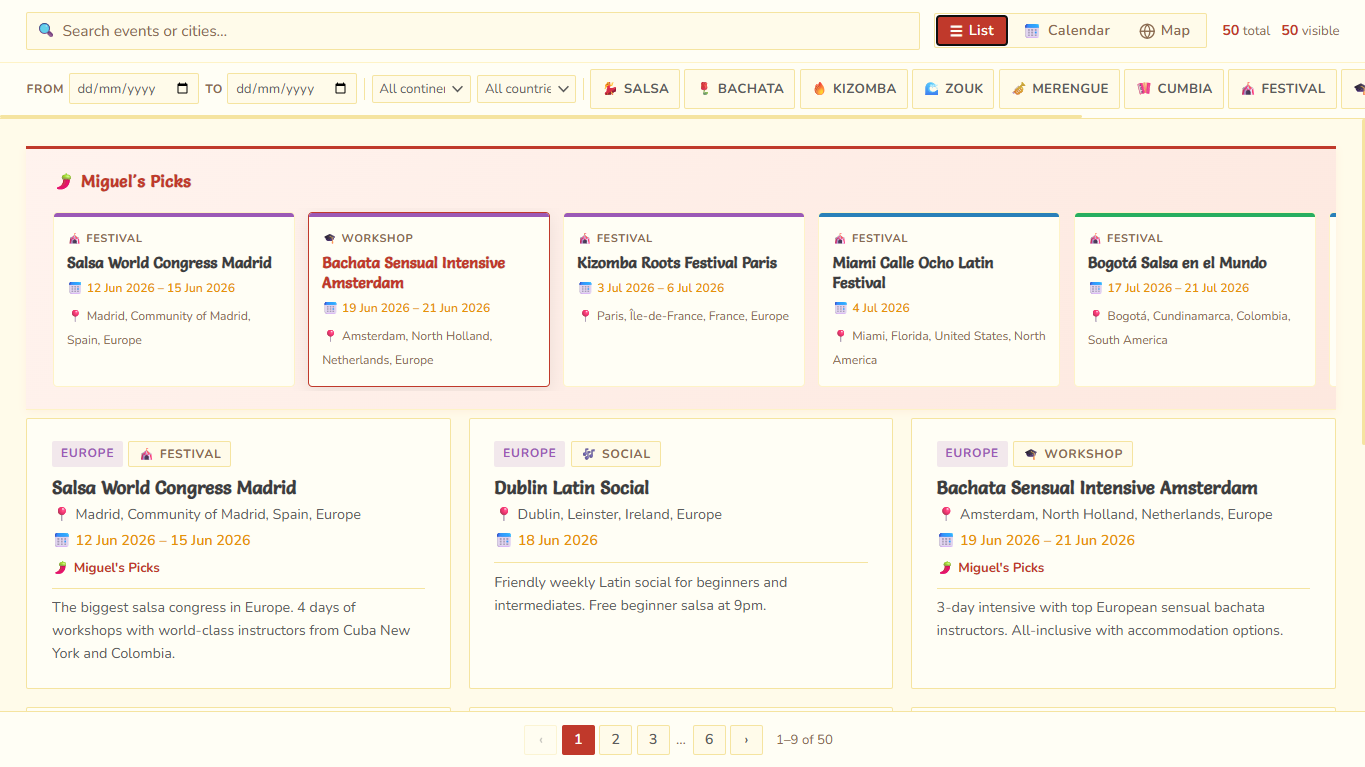
Turn a Google Sheet into a stunning, filterable event calendar — with List, Calendar and Map views. Fully branded. Zero code. Live in 18 seconds.

★★★★★
Loved by 40+ event communities worldwide

Used by communities across dance, music, sports & arts

💃 Salsa scenes
🤸 Acroyoga networks
🎤 Karaoke leagues
🏃 Running clubs
🎨 Arts collectives
🌍 Expat groups
Live demo

Try it yourself — this is the real thing

Click around, filter, switch views. No signup needed.

See KaraokeEvents full screen See BailaConmigo full screen

A calendar your people will actually use

Three views, smart filters, curated picks, subscriber emails — all synced live from your Google Sheet. No plugins. No hosting. No headaches.

☰
List, Calendar & Map
Switch seamlessly between a clean event list, a monthly calendar, and an interactive world map. All views share the same filters and search in real time.
🎨
100% Your Brand
Set your own colors, fonts, logo, and domain. We've designed every pixel to be overrideable — your calendar looks like you built it from scratch.
📊
Google Sheets as Your CMS
Your team already knows Google Sheets. Add an event, hit save — the calendar updates in seconds. No logins, no form portals, no training needed.
⭐
Curated Picks Carousel
Highlight hand-picked events in a premium scroll-strip at the top. Perfect for sponsor slots, partner events, or "don't miss this" moments.
🔍
Smart Filters & Search
Filter by category, date range, continent, and country. Full-text search across names, cities, and venues — instant results, no page reload.
📰
Newsletter generator
Generate the calender content of your newsletter with the events in your Google sheets. Gouped on Month, Continent or Category
🔗
Embed Anywhere
One line of code drops your calendar into WordPress, Webflow, Squarespace, Wix — anywhere. Or share the standalone URL directly.
🌍
Multi-Brand Calendars
Run up to 3 separately branded calendars from a single account — a salsa calendar, a bachata one, a festivals-only view — all from the same Orbit subscription.
📧
Subscriber Emails Coming soon
Let visitors subscribe to your calendar and receive a weekly events digest automatically. Growing your list without touching any extra tool.

EventGrid vs the old way

WordPress plugins were built for a different era. See what you're actually getting for your money.

Feature
⚡ EventGrid
The Events Calendar (Tribe)
Timely
Sugar Calendar
List + Calendar + Map views
✓
Add-ons
✓
✗
Google Sheets as data source
✓
✗
✗
✗
No WordPress required
✓
✗
✓
✗
Full color & font branding
✓
CSS only
Limited
Limited
Curated / featured picks
✓
Paid add-on
Paid tier
✗
Subscriber email list built-in
Roadmap
✗
Paid tier
✗
Setup time
~15 minutes
Hours + hosting
30–60 min
Hours + WP
Starting price / month
€0 – €50
$179/yr+
€9/mo+
$55/yr+

Up and running in 15 minutes.

No developers, no hosting, no complicated software. If you can manage a spreadsheet, you can run an EventGrid calendar.

1
Your events go in a spreadsheet
Use Google Sheets — the same way you probably already track events. Add a row, fill in the details. That's your entire CMS.
2
One small setup step (we help)
There's a quick 15-minute technical step to connect your sheet to EventGrid. We provide a step-by-step guide with screenshots — and on paid plans, we just do it for you.
📖 Full manual included · We set it up for you on Pulse & Orbit
3
Make it look like yours
Pick your colors, upload your logo, set your font. Your calendar gets its own link — share it, embed it on your website, done.
4
Update the sheet, calendar updates
From now on: edit the spreadsheet, changes appear on your calendar within minutes. No extra logins. No publish buttons. Your whole team can contribute.
⚡ How the pieces fit
📋
Your Google Sheet
Add events as rows. Your team already knows how to do this — no training needed.
You own the data, always
↓
🔌
A small connector (one-time setup)
A tiny free bridge that reads your sheet and feeds it to your calendar. Setup takes ~15 min with our guide — or we do it for you.
Free to run · Setup help included
↓
🌐
Your EventGrid Calendar
Live, branded, and always up to date. List, Calendar and Map views — shareable as a link or embedded on your site.
Auto-updates · Zero maintenance
🙋 Need a hand with setup?
On Pulse and Orbit we handle the technical setup for you — just share your spreadsheet link and we take care of the rest. Usually done same day.

Start free. Grow on your own terms.

No contracts. No credit card to start. Upgrade or cancel any time.

Starter
€0/mo
Dip your toes in. Perfect for testing the concept with a small local scene.
  • ✓ Up to 10 events
  • ✓ List, Calendar & Map views
  • ✓ Google Sheets sync
  • ✓ Public calendar URL
  • ✓ Basic color theme
  • ✗ Custom domain
  • ✗ Curated picks carousel
  • ✗ Remove EventGrid branding
  • ✗ Email subscribers
Get started free
Most popular
Pulse
€20/mo
For active communities. Unlimited events, full branding, your name front and center.
  • ✓ Unlimited events
  • ✓ List, Calendar & Map views
  • ✓ 1 branded calendar
  • ✓ Unlimited event types & tags
  • ✓ Full color, font & logo control
  • ✓ Curated picks carousel
  • ✓ EventGrid branding removed
  • ✓ Setup guide + support
  • ✗ Email subscriber list
  • ✗ Multiple calendars
Start Pulse — €20/mo →
Full power
Orbit
€50/mo
For networks and platforms. Multiple brands, a built-in audience, and tools to monetize.
  • ✓ Everything in Pulse
  • ✓ 3 separately branded calendars
  • ✓ Priority support + full setup done for you
  • ✓ Copy-paste newsletter HTML snippet
  • 🚀 On the roadmap
  • ◷  Email subscriber list
  • ◷  Weekly event digest emails
  • ◷  Sponsored / promoted slots
  • ◷  Event submission form
  • ◷  Analytics dashboard & API
Start Orbit — €50/mo →

Annual billing available — save 2 months. Need more calendars or a white-label deal? Let's talk →

Communities already up and running

★★★★★

"We ditched a €200/yr WordPress plugin and had EventGrid live the same afternoon. The map view made our global community absolutely lose it."

M
Miguel Torres
Salsa community · Madrid
★★★★★

"We finally have one place to send people when they ask 'what's on?' — and it actually looks good. Our community grew just from sharing the link."

L
Lena Brandt
Swing scene · Berlin
★★★★★

"Our organizers just update the Google Sheet and everything's live. Zero tech support. I've got my weekends back. Worth every cent."

A
Aiko Nakamura
Contact improv · Tokyo

Honest answers

Do I need to know how to code?+
Nope. The only technical step is a one-time 15-minute setup — and we provide a guide with screenshots for every single click. On Pulse and Orbit, we just do it for you.
What is this "small connector" in the setup?+
It's a tiny free piece of tech (a Cloudflare Worker, if you're curious) that reads your Google Sheet and feeds it to your calendar. It runs for free, you set it up once and never touch it again. We walk you through it step by step — or we do it for you on paid plans.
How often does the calendar update when I edit the sheet?+
EventGrid polls your Worker endpoint every 5 minutes. So within 5 minutes of saving a row in Google Sheets, it appears on your public calendar. No refresh buttons, no manual publishing.
Can I use my own domain name?+
Yes, you embed the calendar on your own domain.
What are the "3 calendar holders" in Orbit?+
Each holder is a completely independent branded calendar — its own name, logo, colors, domain, and Google Sheet. So you could run a salsa calendar, a bachata calendar, and a festivals-only view from one Orbit account. Great for agencies or multi-discipline communities.
Can I sell sponsored slots to event organizers?+
Yes — on Orbit you get a "Promoted" badge and carousel slots you can offer to organizers. How you price and sell them is entirely up to you. A common approach: charge €5–€20/event for a featured slot. With enough traffic that alone pays your Orbit subscription.
Is there a free trial on paid plans?+
Every paid plan comes with a 14-day free trial, no credit card needed. You get full access — see it live with your real events before paying anything.
Your community is waiting to see what's on.

Up and running in 15 minutes. Free to start, no credit card, no code required.

Get in touch

Ready to get started?

Tell us a bit about your community and we'll get you set up — usually within a day.